
July 18, 2026
How to Plan a Binge-Watch When Franchise Movies and Series Are Spread Across Multiple OTT Platforms
Why a Simple Watch Order Is Not Enough for Franchise Marathons
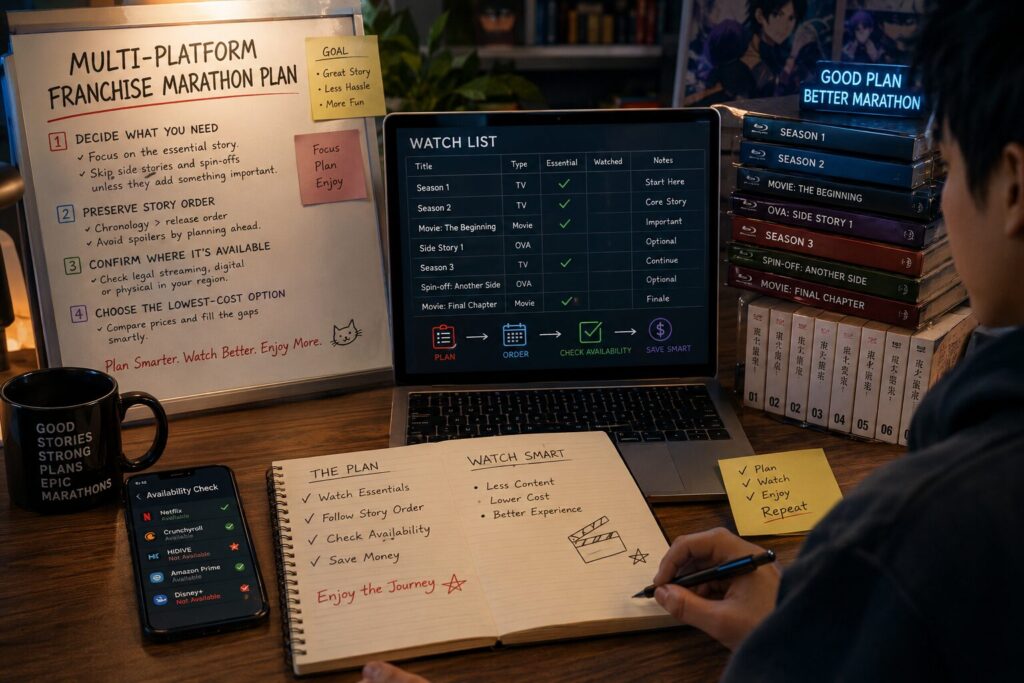
A multi-platform franchise marathon should be planned in this order: decide what you actually need to watch, preserve the correct story order, confirm where each title is legally available in your region, and then choose the lowest-cost way to fill the gaps.
Do not begin by subscribing to every service associated with the franchise. Many franchises contain side stories, animated series, older adaptations and loosely connected spin-offs that may not be necessary for the experience you want. A shorter, clearly defined watch list usually costs less and is easier to complete.
Build the Watch Order Before Comparing Streaming Services
Start by deciding what kind of marathon you are planning. A first-time viewer will usually have a different list from someone revisiting a franchise or exploring every connected production.
Release order is generally the safer choice for a first viewing because it preserves the order in which characters, revelations and post-credit scenes were originally introduced. Chronological order may work better for a rewatch, but it can reveal information earlier than intended or interrupt story arcs with prequels and spin-offs.
Next, divide the franchise into three levels:
| Title type | How to treat it |
|---|---|
| Core | Required to understand the main storyline |
| Supporting | Adds context to important characters or events |
| Optional | Spin-offs, alternate versions or side stories that can be skipped without losing the main plot |
This classification matters more than creating the longest possible franchise list. If a supporting series requires another subscription but does not materially affect the story you want to follow, skipping it may be the better decision.
Once the list is defined, record the titles in the order they should be watched. Do not group them by service yet. Platform convenience should not silently replace the intended viewing order.
Map Each Title to Its Current Regional Viewing Option
Streaming rights change by country and over time. A film included with a subscription in one market may be available only as a rental in another. Titles can also leave a service when licensing agreements expire.
Use a streaming search service such as JustWatch to create an initial map, making sure the correct country is selected. It can show which services list a movie or series and whether it is offered through a subscription, rental or purchase. Confirm the result on the provider’s own app or website before subscribing or paying, especially when the marathon will not begin immediately.
Your tracker only needs a few practical fields:
| Order | Title | Priority | Current access | Backup option | Watch date |
|---|---|---|---|---|---|
| 1 | First title | Core | Existing subscription | Rental | Friday |
| 2 | Second title | Core | Another service | Purchase | Saturday |
| 3 | Spin-off | Optional | Not included | Skip | — |
Check whether the listing is included in the subscription or requires an additional payment. A title appearing inside an OTT app does not always mean that it is included with the standard membership.
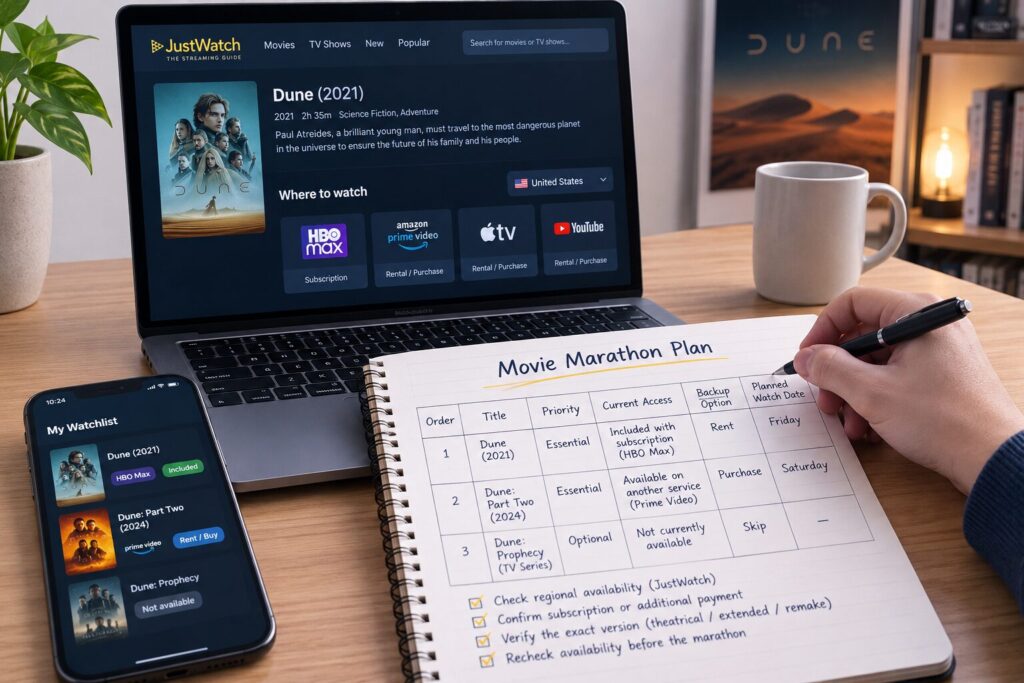
Also verify the exact version. Franchises may contain theatrical cuts, extended editions, remakes, similarly named series or productions from a separate continuity. Selecting the wrong version can disrupt the story even when the platform information is technically correct.
For a long marathon, check availability again shortly before the planned viewing date. Do not rely on an availability search completed several weeks earlier.
Choose the Cheapest Access Plan Without Breaking the Story
After mapping the titles, compare access strategies rather than automatically adding every required service.
| Situation | Usually the most practical option |
|---|---|
| Several required titles are included on one service | Subscribe for one billing period |
| Only one required film is missing | Compare a rental with one month of service |
| Missing title is optional | Skip it or watch it after the main marathon |
| Rental window is too short for the schedule | Rent closer to the viewing date or purchase it |
| A service contains titles spread throughout the watch order | Keep that subscription active for the relevant period |
| Most titles are already owned or available through existing plans | Avoid adding another recurring subscription |
Calculate the total cost of the whole plan, not the price of one title in isolation. Include any subscription you already intend to keep, new monthly plans, rentals, purchases and possible automatic renewals.
For example, a one-month subscription may be reasonable when it unlocks four required films and a connected series. Renting may be more economical when only one core title is missing. However, actual prices, taxes and catalog inclusion vary by country, so the comparison must use the checkout prices visible in the viewer’s own region.
Preserving the story order should take priority over reducing the number of app switches. Watching every title on Service A before moving to Service B may be convenient, but it is a poor plan when the required sequence alternates between the two.
Instead, reduce unnecessary subscription switching. Keep one service active for the full period in which its titles appear, and activate a second service only when the planned dates justify it. Immediately record renewal dates and cancel any temporary plan after confirming that cancellation will not remove access before the marathon is complete.
Lock the Schedule and Prepare for Missing or Expiring Titles
Assign each core title a realistic viewing date. Leave some buffer for long movies, multi-episode series and group scheduling problems. A plan that assumes several films every day is more likely to fail and may cause a rental or subscription period to expire before it is used.
Prioritize a title when the provider clearly indicates that it is leaving soon. Otherwise, preserve the planned story order and use a backup access method if the title disappears.
Offline downloads can reduce connection problems, but they should not be treated as permanent ownership. Netflix states that downloaded titles can expire and that downloads are removed when an account is canceled. Some titles may also have annual download limits.
Disney+ similarly applies eligibility and expiration conditions to downloaded content. The exact rules can depend on the subscription, title and region.
Rentals require even more precise timing. Apple’s current rental terms, for example, provide 30 days to begin a rented film and 48 hours to finish after playback starts. Other stores may use different periods, so rent only after checking the applicable deadline.
Before starting the marathon, every core title should therefore have one of four outcomes: confirmed subscription access, a rental scheduled for the correct date, a purchased copy, or an agreed replacement plan. Optional content should never force an expensive subscription unless the group has deliberately chosen a completionist marathon.